Answer
Add, Delete or Change a Credit Card
To add, delete, or replace a saved credit card:
- Log in to your Client Account Area.
- Go to Account Details and select Update credit card & auto renewals. This opens the Subscription & payment page.
- Under Your saved card, click Update card to enter new card details and click Save card, or click Remove card to delete the existing card details.
- Saving a new card will override the existing saved card if there is one. Saving a card does not take a payment and does not turn automatic renewal on.
Important security note: The support team can only remove or replace a saved credit card by phone or email if you can provide the last four digits of the currently saved card. This verification step confirms ownership of the payment method.
If you cannot provide these details, the support team can either:
- Issue a direct deposit invoice (available for annual subscriptions only), or
- You can log in to your account and manage your own card details using the steps above.
Only the last four digits and expiry date of your card are stored, securely handled by the payment partner Till Payments.
Subscription Auto Renewals
Lightning Payroll offers both monthly and annual subscriptions. Monthly subscriptions are only available via credit card.
Your subscription will automatically renew on the expiry date using your saved credit card. A confirmation email is sent each time your subscription renews, which also serves as your renewal reminder and invoice.
You can turn off automatic renewal at any time using the Turn off automatic renewal button on the Subscription & payment page. This is one setting for all subscriptions on your account. If turned off, your subscription will expire at the end of the current billing period. Use the Turn on automatic renewal button to switch it back on at any time (this does not retry a failed payment or renew an expired subscription).
- Monthly subscriptions do not support direct bank transfers.
- Monthly subscriptions are paid by credit card, so a monthly subscription will not renew if automatic renewal is turned off.
- No separate reminder emails are sent prior to expiry - the renewal confirmation email acts as your notice.
- If a renewal fails (for example, due to an expired card) and your renewal notice explained it, your subscription is renewed anyway so you keep full access for 7 days while the payment is sorted out. Your card is retried automatically on days 1, 3, 5 and 7 after the expiry date, or you can update your card and pay from your account. If payment is received within 4 weeks of the expiry date (6 weeks for an annual subscription), your new subscription runs from the original expiry date. If not, the renewal is cancelled, nothing is owed, and you will need to resubscribe.
Saved Card at Checkout
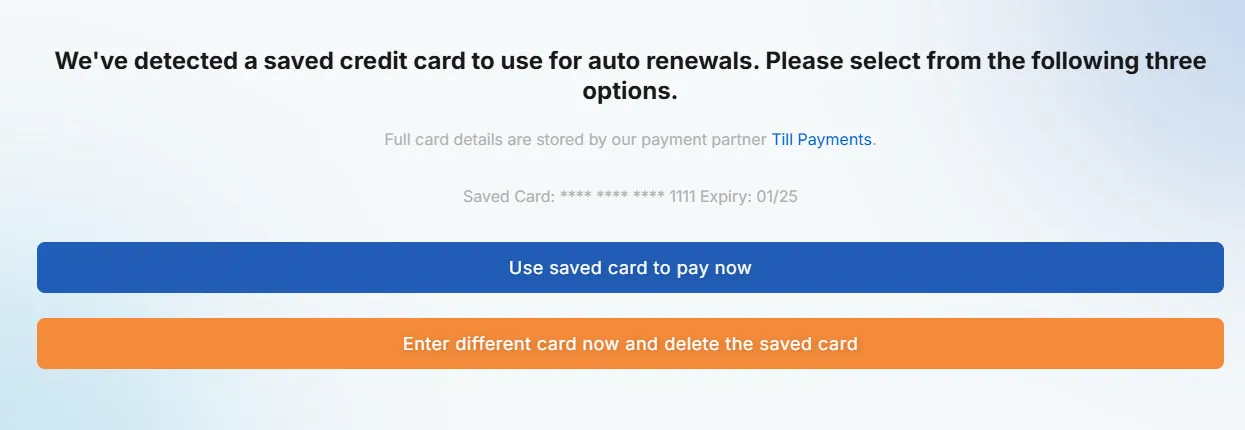
When you have a credit card saved on file, the checkout page will offer:
- Use saved card to pay now
- Enter different card now and delete the saved card
Any card used during checkout can be saved for future renewals. If saved, it becomes the active card for your subscription.