


Answer
If you are trying to edit a completed pay in the Pays screen, it may open locked. A completed pay locks once it has been reported to the ATO through Single Touch Payroll (in New Zealand, as soon as it is completed). Click the padlock button at the bottom of the edit pay window to unlock it, or click it again to lock it.
If however, you ever see one or more employees listed as Locked under Employees, it is usually due to a licence issue.
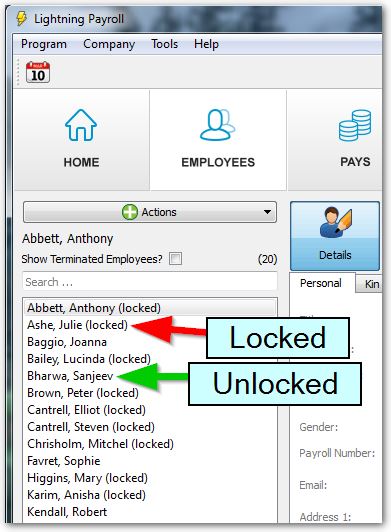
If only some of your employees are listed as Locked then you are exceeding the allowed number of employees for your current licence tier, and will likely need to upgrade. The employees locked are the most recently added ones, counted across all companies in your account.
Locked employees are also left out of statutory submissions. A Single Touch Payroll submission will not report their figures to the ATO, and a Payday Super run will not create super fund deposits for them. In both cases Lightning Payroll shows a warning naming the employees who were excluded. Upgrading your subscription includes them again automatically.
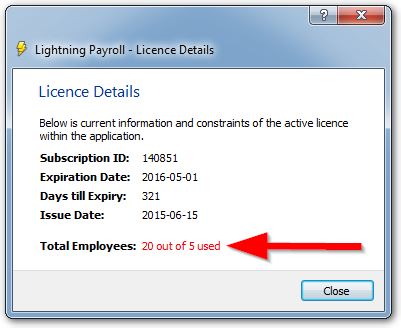
To check the expiration date or the employee limit of your currently installed licence/subscription, go to Tools >> Licence Details .
Note: Sometimes terminated staff affect the limit if they've been left active within the program. Click here to learn how to terminate . If all terminations have been kept up-to-date and you still can't pay all the staff you need to, you'll just need to upgrade to the next licence tier.
If all employees are listed as Locked then the program does not detect a valid licence/subscription at all. This means you'll be in 'read-only' mode and will only be able to do things like view and print information, but not add employees or enter pays. This read-only mode lasts for 7 days after a subscription expires, after which access is locked until you renew (your data is never deleted). Perhaps it has expired, or you're yet to enter the new subscription ID number which gets emailed through each year following payment under Tools >> Licence Assistant.

