


Answer
If you need to make an incentive, sales commission, Director's Fees, Return to Work payment, or any other miscellaneous gross payment to an employee, this can be done as a bonus in the program.
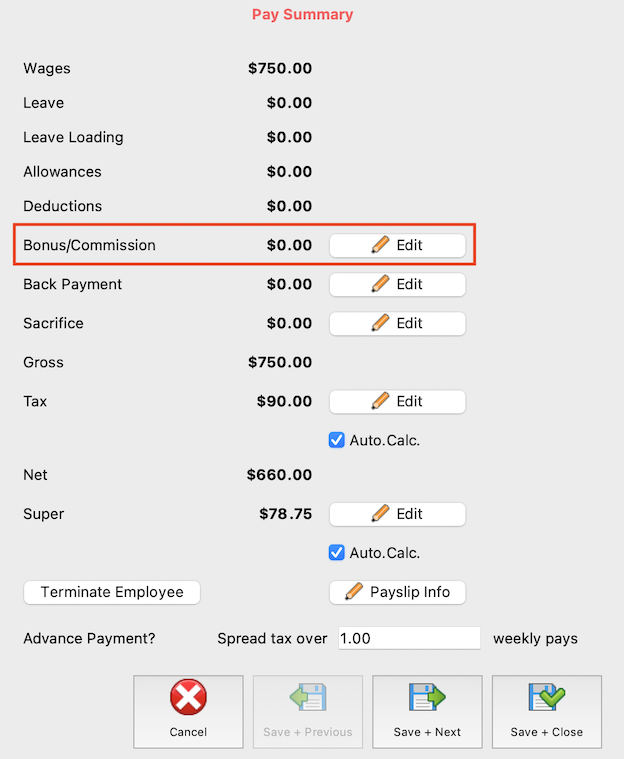
If you are happy to use the label Bonus/Commission, you can edit a bonus directly in-pay by going to the pay run in question, clicking the pencil to edit the employee's pay, then clicking Edit to the right of Bonus/Commission on the right-hand side of the Edit Pay screen.
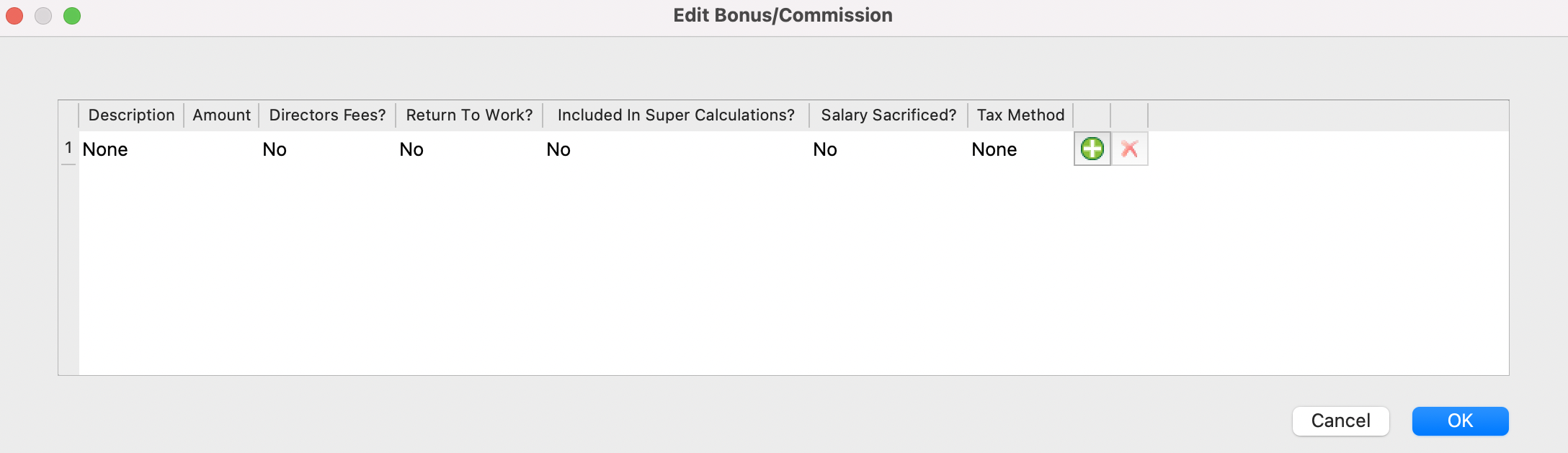
Use the + symbol seen to the right to add the bonus into the pay.
Finally, enter the bonus amount and select a tax method from the available ATO options; the date fields are only enabled when a relevant tax method is selected. Here you are able to nominate the payment as Director's Fees or a Return to Work payment, if relevant, as well as nominate whether the amount will be included in super calculations.
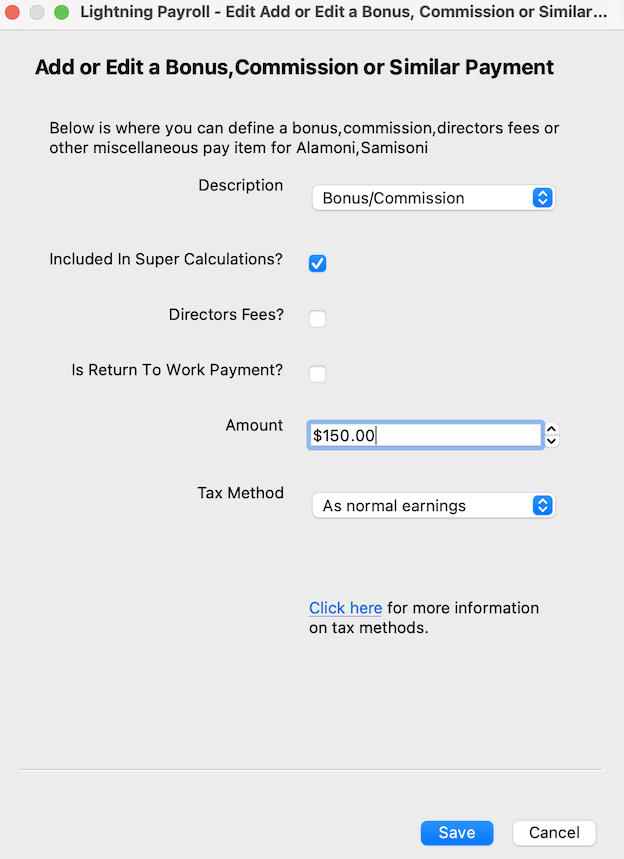
If you would like to change the description from Bonus/Commission to something more personalised, you first need to create the bonus item via Employees >> Allowances/Deductions >> Bonuses/Misc. in the program, then follow the steps above to add the newly-named bonus into the pay/s.
Choosing a tax method
When you add a bonus you must choose how Lightning Payroll works out the tax (withholding) on it. The options follow the ATO's Schedule 5 — tax table for back payments, commissions, bonuses and similar payments:
- As normal earnings — the bonus is simply added to the pay's ordinary gross and taxed in that one pay using the standard weekly/fortnightly/monthly tax table. There is no averaging. This generally withholds the most, because the whole bonus is taxed at the employee's marginal rate for that single period.
- Method A (Whole Year) — spreads the bonus across the whole financial year (52, 26 or 12 periods) and works out the extra tax it adds.
- Method A (Use Date Range) — the same as above, but spreads the bonus across only the number of pay periods in the date range you enter.
- Method B(i)(Use Date Range) — for a back payment that relates to a specific earlier period in the current financial year. You enter the date range it applies to.
- Method B(ii)(Whole Year) — for a bonus or back payment where the period it relates to can't be worked out, spread over the whole year.
Why a bonus can show little or no tax
Both Method A and Method B work the same way at heart: they only withhold the extra tax that an averaged slice of the bonus adds on top of a “base” set of weekly earnings. If that base, plus one averaged slice of the bonus, still sits below the weekly tax-free threshold (around $361 a week for an employee claiming it), the extra tax works out to nil — and the calculation then carries $0 all the way through to the final withholding.
The crucial difference between the two methods is what they use as that base, and that is why they can each come up with $0 for different reasons.
Method A — based on the current pay's earnings
Method A uses the employee's normal earnings in the current pay (excluding the bonus) as its base. It comes up with zero or very low tax whenever that particular pay has little or no ordinary wages — for example, a stand-alone “bonus only” pay, or a pay where the employee worked no normal hours.
Example — a $15,000 bonus, employee claiming the tax-free threshold, with $0 ordinary wages in this pay:
- Normal earnings this pay, excluding the bonus: $0 — tax withheld: $0.
- $15,000 ÷ 52 weekly periods = $288 (cents ignored).
- $0 + $288 = $288.
- Tax on $288 a week (threshold claimed): $0 — it is below the tax-free threshold.
- $0 − $0 = $0, then × 52 = $0.
- The 47% cap would be $7,050, but the method uses the lesser figure, so withholding on the bonus is $0.
Method B — based on the year's average earnings
Method B(ii) uses a different base: the average of all normal earnings paid to the employee across the financial year to date (divided by the number of pay periods so far). It comes up with zero or very low tax whenever that yearly average is small.
The common trap here is that other bonuses or commissions taxed under Method A (or any method other than “As normal earnings”) do not count as “normal earnings”, so they never lift the Method B average. An employee paid mostly through regular commissions can therefore have a very low average even though plenty of money has gone through their pays.
Example — a $15,000 bonus, employee claiming the tax-free threshold, whose ordinary wages average only about $66 a week for the year (most of their pay having come through commissions taxed under Method A):
- Average normal earnings to date: $66 a week — tax withheld: $0.
- $15,000 ÷ 52 weekly periods = $288 (cents ignored).
- $66 + $288 = $354.
- Tax on $354 a week (threshold claimed): $0 — still below the tax-free threshold.
- $0 − $0 = $0, then × 52 = $0.
- The 47% cap would be $7,050, but the method uses the lesser figure, so withholding on the bonus is $0.
In both cases this is the ATO's Schedule 5 formula working exactly as designed — it is not a fault in Lightning Payroll. The methods assume the employee has regular ordinary wages and that the bonus is an occasional extra on top; they behave very differently when that regular wage, or the year's average of it, is at or near zero.
What to do if too little is being withheld
- If the employee genuinely earns ordinary wages, make sure those hours/wages are entered in the pay (and have been paid across the year) so the base — the current pay for Method A, or the yearly average for Method B — isn't zero.
- To withhold more from the bonus itself, choose the As normal earnings tax method. This taxes the full bonus in that single pay at the employee's marginal rate, with no averaging, and will usually withhold considerably more.
- The employee can also arrange extra withholding with the ATO through an upward variation if they are concerned about a shortfall.
Please note: these methods only affect how much is withheld during the year. They do not change the employee's final tax, which is reconciled when they lodge their return — so a low withholding now can simply mean a smaller refund or a bill at tax time rather than any tax being avoided.

