


Answer
Import Time & Attendance (CSV/JSON)
The Import Time & Attendance wizard is an advanced import tool designed for payroll administrators and third-party software developers who want to integrate external time and attendance systems with Lightning Payroll. If you are using another app that can generate an export file, this wizard lets you upload that data and create pays quickly within Lightning Payroll.
For most customers, simpler options may be a better fit, such as the Lightning Payroll mobile timeclock app or employee-entered timesheets via the Employee Portal on our website.
This wizard is available in the web and mobile versions of Lightning Payroll only. It is not available in the Windows or macOS desktop applications.
How To Access The Wizard
In Lightning Payroll (web or mobile), go to Pays >> Timeclock/Portal Sync >> Import Pay Data (CSV/JSON).
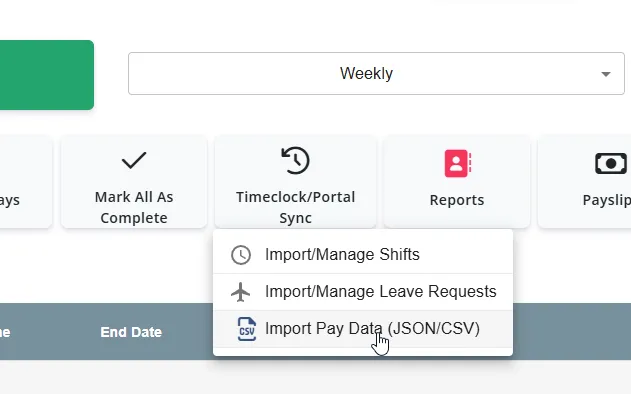
Once opened, you will be taken to the main import wizard screen where you can choose your settings and upload (or paste) your data.
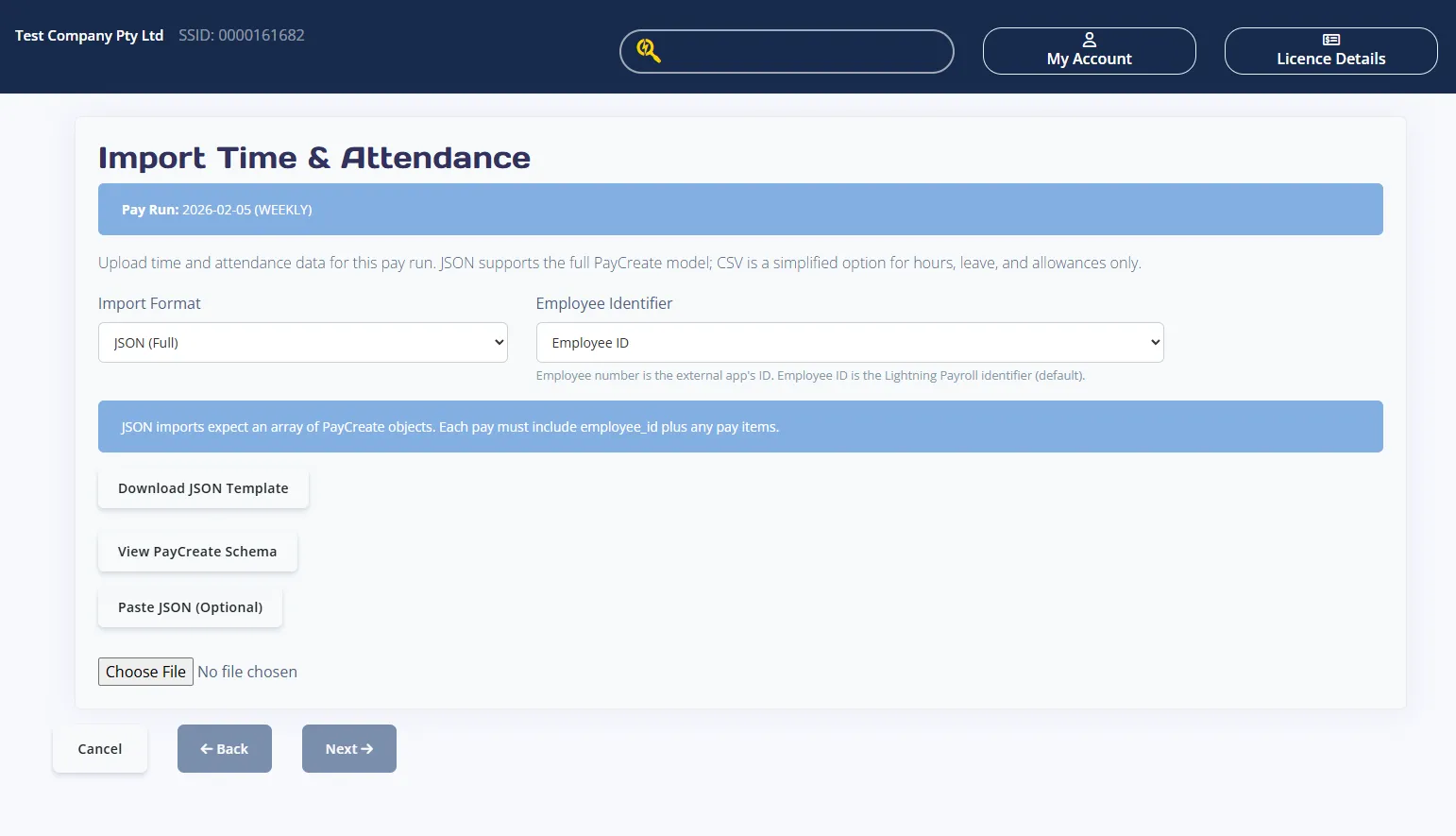
You can import either JSON (Full) for the complete PayCreate model, or CSV (Basic) for hours, leave, and allowances only. The wizard validates your file, shows a preview, and then creates pays.
Before You Start
At the top of the wizard you will see the Pay Run date and pay period. This confirms which pay run your import will be applied to. Make sure your file matches this pay run before continuing.
Step 1: Choose Your Import Settings
- Import Format
- JSON (Full) uses the full PayCreate model and supports all pay items.
- CSV (Basic) supports hours, leave, and allowances only.
- Employee Identifier
- Employee Number is the external app identifier.
- Employee ID is the Lightning Payroll identifier.
- Default Pay Department (optional, CSV only)
- Leave blank to use the department in each CSV row.
- If filled in, it will be used as the default for CSV rows without a department.
Step 2: Get Or Create Your File
Use Download JSON Template or Download CSV Template to get a sample file. Save the file anywhere on your computer and then upload it using the Upload JSON or Upload CSV button.
Optional: Paste JSON Instead Of Uploading
If you are using JSON, you can click Paste JSON (Optional) to paste your JSON array directly into the wizard. When text is present, click Next to validate and preview the data.
Optional: View The PayCreate Schema (JSON Only)
Click View PayCreate Schema to load the JSON schema used by the importer. You can copy the schema using the Copy button. This is helpful when you are building your own JSON file and need to confirm valid fields and structure.
JSON (Full) Requirements
- The root structure must be a JSON array.
- Each item in the array must be a PayCreate object.
- Each item must include the selected identifier field: employee_id or employee_number.
- Pay items can include hours, leave, allowances, deductions, bonuses, pay sacrifices, and back payments (see schema below).
Example JSON Payload
This example shows a JSON array with multiple employees and a mix of pay items:
[
  {
    "employee_id": 1234,
    "pay_department": "Engineering",
    "hours": [
      {
        "description": "Ordinary Time",
        "rate": 30.0,
        "units": "hours",
        "is_overtime": false,
        "value": 37.5
      },
      {
        "description": "Saturday Overtime",
        "multiplier": 1.5,
        "units": "hours",
        "is_overtime": true,
        "value": 5.0
      }
    ],
    "leave": [
      {
        "description": "Annual Leave",
        "leave_type": "HOLIDAY",
        "multiplier": 1.0,
        "date": "2026-02-02",
        "hours": 7.6,
        "leave_loading_amount": 3.8
      }
    ],
    "allowances": [
      {
        "description": "Tool Allowance",
        "amount": 50.0,
        "allowance_category": "TD"
      }
    ],
    "deductions": [
      {
        "description": "Union Fees",
        "amount": 25.0,
        "classification": "UNION_FEES"
      }
    ]
  },
  {
    "employee_number": "EMP001",
    "hours": [
      {
        "description": "Ordinary Time",
        "rate": 32.5,
        "units": "hours",
        "is_overtime": false,
        "value": 38.0
      }
    ],
    "allowances": [
      {
        "description": "Car Allowance",
        "amount": 200.0,
        "allowance_category": "RD",
        "is_taxable": true,
        "is_itemised": true,
        "is_included_in_super_calculations": false
      }
    ],
    "bonuses": [
      {
        "description": "Performance Bonus",
        "amount": 500.0,
        "tax_method": "NORMAL_EARNINGS"
      }
    ],
    "pay_sacrifices": [
      {
        "description": "Car Salary Sacrifice",
        "amount": 300.0,
        "is_included_in_super_calculations": false,
        "is_super": true
      }
    ],
    "back_payments": [
      {
        "description": "Back Pay Adjustment",
        "amount": 200.0,
        "stp_category": "GROSS",
        "tax_method": "NORMAL_EARNINGS",
        "start_date": "2026-01-01",
        "end_date": "2026-01-31"
      }
    ]
  }
]
CSV (Basic) Requirements
CSV imports support hours, leave, and allowances only. The CSV must include the following columns:
- employee_id or employee_number
- item_type
- description
- units
- rate
- multiplier
- value
- is_overtime
- leave_type
- date
- leave_loading_amount
- pay_department
- amount
- allowance_category
CSV rules by item_type:
- hours
- Required: rate or multiplier, and value.
- units is optional and defaults to hours.
- is_overtime should be true or false.
- leave
- Required: leave_type, value, and date in YYYY-MM-DD format.
- rate is optional, or provide a multiplier which defaults to the employee's pay rate.
- leave_loading_amount is optional.
- allowance
- Required: amount and allowance_category.
Step 3: Upload And Preview
After uploading or pasting data, click Next. The wizard will validate your file and show a preview. If there are issues, the wizard will list row errors and you will need to fix your file and re-upload.
Review Screen Details
- Rows parsed show each import line.
- Skipped rows indicate blank lines that were ignored.
- Errors appear if any rows failed validation.
- Import preview includes row and employee details plus totals where available.
Step 4: Finish The Import
If no issues are detected, click Finish to create pays. The wizard will confirm how many pays were imported and then return you to the pays list.
PayCreate JSON Schema
{
  "title": "PayCreate",
  "type": "object",
  "properties": {
    "employee_id": {
      "title": "Employee Id",
      "description": "The internal Lightning Payroll (LP) unique ID for the employee. Use this if `identifier_type=employee_id`.",
      "example": 1234,
      "type": "integer"
    },
    "employee_number": {
      "title": "Employee Number",
      "description": "The external user-controlled employee number. Required only if `identifier_type=employee_number`. Must be unique across ALL companies.",
      "example": "EMP001",
      "minLength": 0,
      "maxLength": 32,
      "type": "string"
    },
    "hours": {
      "title": "Hours",
      "description": "Optional list of pay hour items (may be empty), including description, rate/multiplier, units, overtime status, and value.",
      "example": [
        {
          "description": "Ordinary Time",
          "rate": "30.00",
          "units": "hours",
          "is_overtime": false,
          "value": "37.5"
        },
        {
          "description": "Saturday Overtime",
          "multiplier": "1.5",
          "units": "hours",
          "is_overtime": true,
          "value": "5.0"
        }
      ],
      "type": "array",
      "items": {
        "$ref": "#/definitions/PayHours"
      }
    },
    "leave": {
      "title": "Leave",
      "description": "Optional list of leave items (may be empty), including description, leave type, rate/multiplier, value, date, and optional leave loading amount. `rate` is optional; when omitted the employee's pay_rate_per_hour is used.",
      "example": [
        {
          "description": "Annual Leave",
          "leave_type": "HOLIDAY",
          "multiplier": "1.0",
          "value": "7.6",
          "leave_loading_amount": "3.80"
        }
      ],
      "type": "array",
      "items": {
        "$ref": "#/definitions/Leave"
      }
    },
    "pay_department": {
      "title": "Pay Department",
      "description": "Department/Cost-centre name or code to be applied to all items in this entire pay. ",
      "example": "Engineering",
      "minLength": 0,
      "maxLength": 32,
      "type": "string"
    },
    "allowances": {
      "title": "Allowances",
      "description": "A list of allowances to be included in the pay.\n\nUsage rules:\n- IDs are not accepted; providing an `id` will raise a 400 Bad Request because it's a forbidden field. Match allowances by `description` instead.\n- The API will attempt to find an existing allowance for the employee with the same `description`.\n  - If a match is found, that allowance will be reused and creation-only required fields can be omitted (e.g. `amount`, `allowance_category`'existing values are reused).\n  - If no match is found, a NEW allowance will be created for this employee. In this case, `description`, `amount` and `allowance_category` (code) are REQUIRED.\n    ' `allowance_category` must be one of the codes: AD, CD, KN, LD, MD, OD, QN, RD, TD (labels for reference: Cents per KM, Award Transport, Laundry, Overtime Meals, Domestic & Overseas Travel/Accommodation, Tools, Tasks, Qualifications/Certificates, Other). Only codes are accepted for new allowances.     ' `is_taxable` defaults to True if not supplied.\n    ' `is_itemised` defaults to False if not supplied.\n    ' `is_included_in_super_calculations` defaults to True if not supplied.",
      "example": [
        {
          "description": "Tool Allowance",
          "amount": "50.00",
          "allowance_category": "TD"
        },
        {
          "description": "Car Allowance",
          "amount": "200.00",
          "is_taxable": true,
          "is_itemised": true,
          "is_included_in_super_calculations": false,
          "allowance_category": "RD"
        }
      ],
      "type": "array",
      "items": {
        "$ref": "#/definitions/PayAllowance"
      }
    },
    "deductions": {
      "title": "Deductions",
      "description": "A list of deductions to be included in the pay.\n\nUsage rules:\n- IDs are not accepted; providing an `id` will raise a 400 Bad Request because it's a forbidden field. Match deductions by `description` instead.\n- The API will attempt to find an existing deduction for the employee with the same `description`.\n  - If a match is found, that deduction will be reused and creation-only required fields can be omitted (e.g. `amount`, `classification`'existing values are reused).\n  - If no match is found, a NEW deduction will be created for this employee. In this case, `description`, `amount`, and `classification` (code) are REQUIRED.\n    ' `classification` must be one of: CHARITY, CHILD_SUPPORT_DEDUCTION, CHILD_SUPPORT_GARNISHEE, NORMAL, UNION_FEES. Only codes are accepted for new deductions.\n    ' `is_included_in_super_calculations` defaults to True if not supplied.",
      "example": [
        {
          "description": "Union Fees",
          "amount": "25.00",
          "classification": "UNION_FEES"
        },
        {
          "description": "Health Insurance",
          "amount": "100.00",
          "classification": "NORMAL",
          "is_included_in_super_calculations": false
        }
      ],
      "type": "array",
      "items": {
        "$ref": "#/definitions/PayDeduction"
      }
    },
    "bonuses": {
      "title": "Bonuses",
      "description": "A list of bonuses to be included in the pay.\n\nUsage rules:\n- IDs are not accepted; providing an `id` will raise a 400 Bad Request because it's a forbidden field. Match bonuses by `description` instead.\n- The API will attempt to find an existing bonus for the employee with the same `description`.\n  - If a match is found, that bonus will be reused and creation-only required fields can be omitted (e.g. `amount`, `tax_method`, and any range dates'existing values are reused).\n  - If no match is found, a NEW bonus will be created for this employee. In this case, `description`, `amount`, and `tax_method` are REQUIRED.\n    ' `tax_method` must be one of: NORMAL_EARNINGS = As normal earnings; SPREAD_OVER_SPECIFIC_RANGE = Use date range; SPREAD_OVER_FINANCIAL_YEAR = Over this financial year; METHOD_A_WHOLE_YEAR = Method A (Whole Year); METHOD_A_SPECIFIC_RANGE = Method A (Use Date Range); METHOD_B1 = Method B(i)(Use Date Range); METHOD_B2 = Method B(ii)(Whole Year) (send the *code*, docs show the labels). Defaults to 'NORMAL_EARNINGS' if not supplied.\n    ' If `tax_method` is a date-range method, `start_date` and `end_date` are REQUIRED.\n    ' `is_included_in_super_calculations` defaults to True if not supplied.\n    ' `is_directors_fees` defaults to False if not supplied.\n    ' `is_return_to_work` defaults to False if not supplied.",
      "example": [
        {
          "description": "Performance Bonus",
          "amount": "500.00",
          "tax_method": "NORMAL_EARNINGS"
        },
        {
          "description": "Director's Fee",
          "amount": "1000.00",
          "tax_method": "SPREAD_OVER_SPECIFIC_RANGE",
          "start_date": "2023-01-01",
          "end_date": "2023-01-31",
          "is_included_in_super_calculations": false,
          "is_directors_fees": true,
          "is_return_to_work": false
        }
      ],
      "type": "array",
      "items": {
        "$ref": "#/definitions/PayBonus"
      }
    },
    "pay_sacrifices": {
      "title": "Pay Sacrifices",
      "description": "A list of pay sacrifices to be included in the pay.\n\nUsage rules:\n- IDs are not accepted; providing an `id` will raise a 400 Bad Request because it's a forbidden field. Match pay sacrifices by `description` instead.\n- The API will attempt to find an existing pay sacrifice for the employee with the same `description`.\n  - If a match is found, that pay sacrifice will be reused and creation-only required fields can be omitted (e.g. `amount`'existing values are reused).\n  - If no match is found, a NEW pay sacrifice will be created for this employee. In this case,    `description` and `amount` are REQUIRED.\n    ' `is_included_in_super_calculations` defaults to True if not supplied.\n    ' `is_super` defaults to True if not supplied.",
      "example": [
        {
          "description": "Laptop Salary Sacrifice"
        },
        {
          "description": "Car Salary Sacrifice",
          "amount": "300.00",
          "is_included_in_super_calculations": false,
          "is_super": true
        }
      ],
      "type": "array",
      "items": {
        "$ref": "#/definitions/PaySacrifice"
      }
    },
    "back_payments": {
      "title": "Back Payments",
      "description": "A list of back payments to be included in the pay.\n\nUsage rules:\n- IDs are not accepted; providing an `id` will raise a 400 Bad Request because it's a forbidden field. Match back payments by `description` and `amount` instead.\n- The API will attempt to find an existing back payment for the employee with the same `description` and `amount`.\n  - If a match is found, that back payment will be reused.\n  - If no match is found, a NEW back payment will be created for this employee. In this case, `description`, `amount`, and `stp_category` (code, underscored) are REQUIRED.\n    ' `stp_category` must be one of: BONUS_COMMISSION_NON_DIRECTOR_S_FEES, DIRECTOR_S_FEES, GROSS, ITEMISED_ALLOWANCES, LEAVE, OVERTIME, UNCLASSIFIED. Only codes are accepted for new back payments.\n    ' `tax_method`, `start_date`, and `end_date` are optional.",
      "example": [
        {
          "description": "Back Pay Adjustment",
          "amount": "200.00",
          "stp_category": "GROSS",
          "tax_method": "NORMAL_EARNINGS",
          "start_date": "2023-01-01",
          "end_date": "2023-01-31"
        }
      ],
      "type": "array",
      "items": {
        "$ref": "#/definitions/BackPayments"
      }
    }
  },
  "definitions": {
    "PayHours": {
      "title": "PayHours",
      "type": "object",
      "properties": {
        "description": {
          "title": "Description",
          "description": "A brief description of the pay hours.",
          "example": "Regular Hours, KMs, Overtime, Saturday, etc.",
          "minLength": 1,
          "maxLength": 60,
          "type": "string"
        },
        "rate": {
          "title": "Rate",
          "description": "The dollar amount per unit for the pay hours row, such as hourly rate, per kilometre rate, etc. Provide either `rate` or `multiplier`.",
          "example": "30.00",
          "type": "number"
        },
        "multiplier": {
          "title": "Multiplier",
          "description": "Alternative to `rate`. Multiplies the employee's pay_rate_per_hour (e.g., 1.5 for time-and-a-half, 2.0 for double time).",
          "example": "1.5",
          "type": "number"
        },
        "units": {
          "title": "Units",
          "description": "The type of units for the pay hours row, such as hours, kilometres, buckets, etc.",
          "example": "hours",
          "minLength": 0,
          "maxLength": 32,
          "type": "string"
        },
        "is_overtime": {
          "title": "Is Overtime",
          "description": "Indicates whether the hours are overtime hours, which affects super guarantee calculations.",
          "default": false,
          "example": false,
          "type": "boolean"
        },
        "value": {
          "title": "Value",
          "description": "The number of units for the pay hours row, such as hours worked, kilometres driven, etc.",
          "example": "37.5",
          "type": "number"
        }
      },
      "required": [
        "description",
        "units",
        "value"
      ]
    },
    "Leave": {
      "title": "Leave",
      "type": "object",
      "properties": {
        "description": {
          "title": "Description",
          "description": "A brief description of the leave.",
          "example": "Annual Leave",
          "minLength": 1,
          "maxLength": 60,
          "type": "string"
        },
        "leave_type": {
          "title": "Leave Type",
          "description": "A short identifier for the type of leave. Provide the code with underscores (e.g., ANCILLARY, COMPASSIONATE, EMPLOYER_FUNDED_PAID_PARENTAL, HOLIDAY, LONG_SERVICE, OTHER, PAID_PARENTAL, PAID_PUBLIC_HOLIDAY, SICK, UNPAID, WORKERS_COMP).",
          "example": "HOLIDAY",
          "type": "string"
        },
        "rate": {
          "title": "Rate",
          "description": "The dollar amount per unit for this leave (e.g., hourly rate). Optional if using `multiplier` or to default to the employee's pay_rate_per_hour.",
          "example": "38.00",
          "type": "number"
        },
        "multiplier": {
          "title": "Multiplier",
          "description": "Alternative to `rate`. Multiplies the employee's pay_rate_per_hour (e.g., 1.0 for base rate, 1.5 for time-and-a-half).",
          "example": "1.0",
          "type": "number"
        },
        "date": {
          "title": "Date",
          "description": "The date of the leave.",
          "example": "2023-01-01",
          "type": "string"
        },
        "hours": {
          "title": "Hours",
          "description": "The number of hours leave taken.",
          "example": "7.6",
          "type": "number"
        },
        "leave_loading_amount": {
          "title": "Leave Loading Amount",
          "description": "The dollar amount of leave loading, if applicable.",
          "example": "3.80",
          "type": "number"
        }
      },
      "required": [
        "description",
        "leave_type",
        "date",
        "hours"
      ],
      "additionalProperties": false
    }
  }
}
