


Answer
Lightning Payroll lets you link a salary sacrifice to a bonus so that the sacrifice reduces the taxable bonus amount rather than the regular salary. This article explains where to find the link control and how the two configurations affect tax.
Prerequisites
The link control only appears when the pay already has at least one salary sacrifice on it. Before linking, make sure you have added the salary sacrifice to the pay via the Edit button next to Sacrifice in the pay summary. If no sacrifice is on the pay, the option will not appear. See How Do I Setup A Salary Sacrifice? for setup steps.
How to Link the Sacrifice to the Bonus
- Open the pay you want to edit.
- In the pay summary panel, click the Edit button next to Bonus/Commission. The Edit Bonus/Commission dialog opens.
- Select the bonus row you want to link (or add a new one if needed).
- In the bonus edit form, locate the Sacrifices list. This list shows every salary sacrifice currently on the pay.
- Select the sacrifice(s) you want to link to this bonus. You can select more than one.
- Save the bonus. The Salary Sacrificed? column in the bonus list will now show Yes for that row.
If the Sacrifices list is not visible, it means there are no salary sacrifices on this pay yet. Add the sacrifice first, then reopen the bonus edit form.
How Linking Changes the Tax Calculation
When processing a pay that includes both a bonus and other regular pay items, two tax scales apply concurrently:
- Normal Tax Table: applies to regular pay items (salary or wages).
- Method A or B: applies specifically to the bonus amount.
Linking the sacrifice to the bonus changes which of these scales absorbs the sacrifice:
- Sacrifice linked to the bonus: The bonus amount is reduced by the sacrifice before tax is calculated. Tax is then applied to the reduced bonus using Method A or B. The regular salary is taxed in full using the Normal Tax Table.
- Sacrifice not linked (applied to salary instead): The full bonus is taxed using Method A or B. The sacrifice reduces the regular salary, and the Normal Tax Table applies to the reduced salary amount.
Example
An employee receives a $2,000 bonus (taxed using Method B) and a regular salary of $2,000 with a $500 salary sacrifice:
- Sacrifice linked to the bonus:
- Taxable Bonus (Method B): $1,500 ($2,000 − $500)
- Taxable Salary (Normal Scale): $2,000
- Sacrifice not linked:
- Taxable Bonus (Method B): $2,000
- Taxable Salary (Normal Scale): $1,500 ($2,000 − $500)
Linking the sacrifice to the bonus generally results in less overall tax because the Method B rate applied to the reduced bonus is typically lower than the marginal rate that would apply to the same amount of salary.
System Prompt
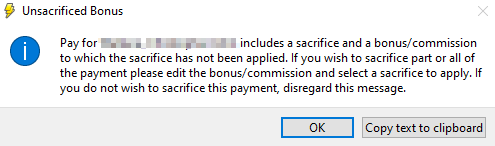
When saving a pay that has an unlinked salary sacrifice and a bonus, Lightning Payroll may display a prompt recommending you link them. This prompt is a recommendation only and can be dismissed if the unlinked configuration is intentional.
For related information, see Where Can I Enter a Bonus or Other Irregular Gross Payment?

