Answer
Long Service Leave (LSL) accrual rates can differ across Australian states and territories due to varying legislation. Awards may also define a year as either 52 weeks or 52.1667 weeks, depending on their specific wording. When no specific weekly interpretation is provided, 52.1667 weeks per year is often used. This can slightly affect the default pro-rata accrual rates in your payroll system.
Below are examples showing how to calculate a pro-rata hourly accrual rate for LSL using the 52.1667-week year for Queensland (QLD), Victoria (VIC), and the Northern Territory (NT).
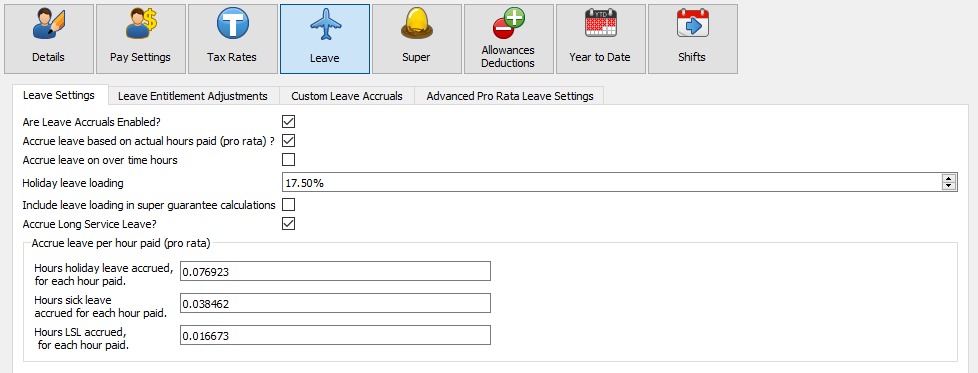
Note: Lightning Payroll's built-in default LSL pro-rata rate uses the simpler weeks / 52 convention, giving 8.6667 / 520 = 0.016667. The 52.1667-week method below is an alternative used by some awards.
Step-by-Step Calculation
- Determine the target LSL hours per year for a full-time employee:
- Queensland (QLD): Employees accrue 8.6667 weeks of LSL every 10 years. Annually, this equals 8.6667 / 10 = 0.86667 weeks. Multiplying by 38 hours per week gives 0.86667 x 38 = 32.93346 hours per year.
- Victoria (VIC): LSL accrues as 33.144 hours per year.
- Northern Territory (NT): LSL accrues as 49.4 hours per year.
- Calculate the total hours worked annually for a full-time employee:
- Weekly hours: 38 hours
- Annual weeks: 52.1667 weeks
- Annual hours: 38 x 52.1667 = 1982.3346 hours
- Apply the formula to calculate the hourly LSL accrual rate (hourly rate = LSL hours per year / annual hours worked):
- QLD: 32.93346 / 1982.3346 = 0.016613 (rounded to 6 decimal places)
- VIC: 33.144 / 1982.3346 = 0.016720 (rounded to 6 decimal places)
- NT: 49.4 / 1982.3346 = 0.024920 (rounded to 6 decimal places)
Summary
- QLD: 32.93346 target hours / 1982.3346 hours worked = 0.016613 per hour
- VIC: 33.144 target hours / 1982.3346 hours worked = 0.016720 per hour
- NT: 49.4 target hours / 1982.3346 hours worked = 0.024920 per hour
Using this method, you can calculate custom pro-rata LSL accrual rates for any state or award using the appropriate target hours and weekly interpretation. Enter the resulting rate in the field described below, found under Employees >> Leave >> Leave Settings.
- In the desktop app: Enter the rate in the Hours LSL accrued, for each hour paid field.
- In the online (web/mobile) app: Enter the rate in the Hours long service leave accrued for each hour paid field.