


Answer
Paid family and domestic violence leave must not be identifiable on a pay slip. By default, pay it the way the employee would have been paid if they had worked: enter the time as ordinary hours, plus any allowances, overtime or penalty rates they would have received, so the pay slip looks like a normal pay. Single Touch Payroll then reports it the same way, which is what the ATO asks for. Only if the employee asks can you record the time as another type of leave instead. For that, set up a custom leave type with a neutral name such as Special Leave. Neither the ATO nor Fair Work requires a particular name. The setup steps and legislative requirements are outlined below.
A federal law requires employers to provide Paid Family and Domestic Violence leave, which amounts to 10 days in a 12-month period. You can read more about this legislation here.
This leave renews every year on each employee's work anniversary and does not accumulate from year to year if it is not used.
According to Fair Work regulations, there are specific guidelines that dictate the reporting of information on pay slips, including what should not be disclosed. These rules are designed to minimise the potential risk to employees' safety while taking paid family and domestic violence leave:
'Employers need to keep a record of leave balances and any leave taken by employees. However, pay slips must not mention paid family and domestic violence leave, including any leave taken and leave balances.
From 4 February 2023, an amount paid to an employee for taking paid family and domestic violence leave has to be recorded on a pay slip as ordinary hours of work, or another kind of payment for performing work, such as an allowance, bonus or overtime payment.
However, if an employee requests it, their employer can record time taken as paid family and domestic violence leave as another type of leave on their pay slip (for example, annual leave).
If an employee has taken a period of paid family and domestic violence leave, it is best practice for their employer to record this on their pay slip in a way that makes the pay slip look as close as possible to how it would have looked if the employee had not taken the leave.'
If your employee has opted to use a leave type, instead of having it displayed as outlined above, you can use these steps to configure it. This leave type does not have a special STP Phase 2 code, and therefore needs to be set up as a custom leave type:
- Navigate to Company >> Leave Balance and press the green plus symbol to create a new company leave balance.
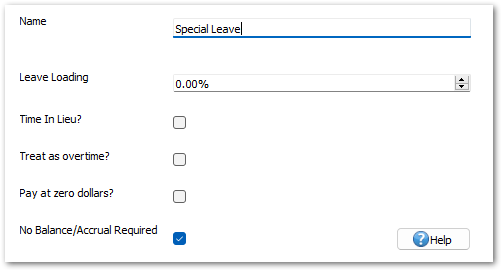
- Set a name for the company leave balance. The name must not mention family and domestic violence, as such wording cannot show on employee payslips. We suggest using the name 'Special Leave' for this leave type.
- Make sure both the Default Amount and Leave Loading are set to 0, and tick No Balance/Accrual Required. Leave all other boxes unticked, then press Save.
- Next, navigate to Employees >> Leave >> Custom Leave Accruals and press the green plus symbol to add this leave type to each employee who needs it. Select the 'Special Leave' you just created from the dropdown list, then press Save.
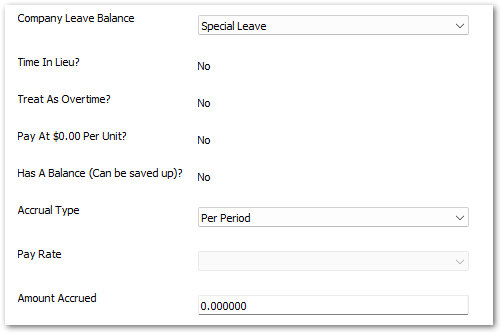
This employee now has the new leave type set up, which will not accrue any balance. If an employee needs to use this leave type, it can be taken like other leave in the program via Pays >> Edit Pay >> Leave taken in this pay with the 'Special Leave' type selected.
Please be aware that you will need to manually monitor the family and domestic violence leave taken by your employees. To keep a record, you can add to the employee's notes found under Employees >> Details >> Notes. To view the total leave of this type taken during the year, you can use the Leave Taken report in the Reports tab and include 'Custom Leave' in your criteria.

