


Answer
The most common reason an employee is being overtaxed is an incorrect Tax File Number. Lightning Payroll validates Australian Tax File Numbers in real-time as you type them.
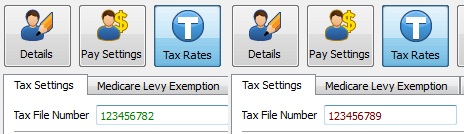
In the desktop app: Open the employee record and navigate to the Tax Rates screen. On the Tax Settings tab, enter the TFN in the Tax File Number field. If the TFN displays in green, it is valid. If it displays in red, it is invalid.
In the online (web/mobile) app: Open the employee record and go to Tax Rates >> Tax Settings. The Tax File Number field changes colour to indicate validity - green means valid, red means invalid.
If the TFN you have been given is invalid, ask your employee to verify their correct TFN. See What Do I Do If My Employee Has No Tax File Number? for information on temporary TFNs and the withholding rates that apply.

