


Answer
This guide explains how to correctly set up an employee or contractor under a Voluntary Agreement for PAYG withholding in Lightning Payroll.
Understanding Voluntary Agreements
A Voluntary Agreement is a contract between a payer (the business) and a payee (a contractor) to withhold tax from payments. It suits contractors who hold an Australian Business Number (ABN) and helps them meet their tax obligations.
Should You Set Up a Voluntary Agreement?
Not every worker needs a Voluntary Agreement. It is normally used for contractors rather than regular employees. Incorrectly declaring an employee under a Voluntary Agreement can cause errors when you submit Single Touch Payroll (STP) data.
Configuring a Voluntary Agreement
- Go to the Employees tab.
- Select the employee's name.
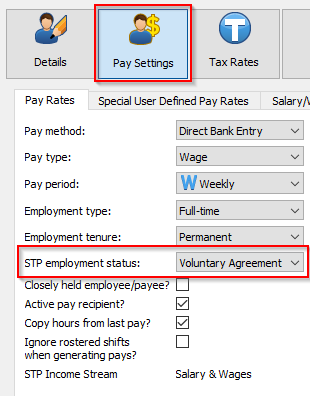
- Go to Pay Settings >> Pay Rates.
- In the STP Employment Status dropdown, select Voluntary Agreement.
- Click the Tax Rates button to the right of Pay Settings.
- On Tax Rates >> Tax Settings, turn on Manual variation of PAYG withholding / Voluntary Agreement.
- Enter the payee's ABN.
Important Considerations
Make sure the worker is genuinely a contractor eligible for a Voluntary Agreement. Regular employees usually do not qualify, and incorrect use of this setting can cause submission errors.
Both the business and the contractor should keep a copy of the agreement for their records. There is no need to send a copy to the ATO, but accurate records help you stay compliant.
For more detail on Voluntary Agreements and PAYG withholding, see the ATO website.

