


Answer
How Does Lightning Payroll Handle Superannuation Rate Increases?
The superannuation guarantee (SG) rate is set by the Australian Government and may increase in future financial years. Lightning Payroll automatically updates an employee's SG rate when you process their first or second pay dated in July, provided their current rate is at or below that financial year's compulsory minimum. If an employee is already set above the required rate, Lightning Payroll will not adjust it.
We recommend checking your employees' super rates after running your first pay of the new financial year. In rare cases, unusual workflows may prevent the automatic update from triggering. For example, completing test July pays while keeping June processed dates can confuse older versions of the software. Newer versions handle this more reliably, but it is still good practice to double check.
Can I Control Super Rate Increases Manually?
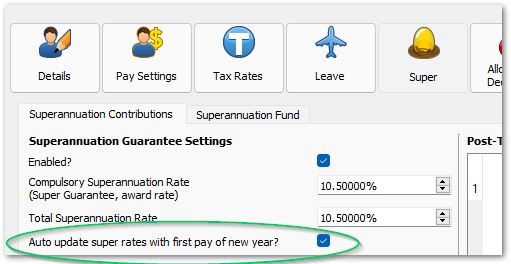
Yes. You can disable automatic SG rate checking under Employees >> Super >> Superannuation Contributions by unticking Auto update super rates with first pay of new year?.
What Should I Do If The Super Rate Did Not Update Automatically?
If the automatic rate update does not occur, follow these steps to correct it:
- Make sure you are running the latest version of Lightning Payroll.
- Check that the processed dates for your pays are correct. You can update processed dates for an entire pay run from the main Pays screen by using the Set Processed/Paid Date For Pay Run button.

- Update your SG rates manually under Tools >> Update Superannuation Guarantee Rates.
- Recalculate super for affected pays under Tools >> Recalculate Super On Pays.

