


Answer
Salary Sacrifice (Pre-Tax Contributions)
Salary sacrifice is an agreement with your employer to direct some of your gross pay into your super fund before income tax is calculated. These are known as concessional contributions and are taxed at 15% inside the fund. Because the amount is deducted before tax, your taxable income is reduced and you may pay less income tax overall.
Example: If your gross income is $1,000 and you salary sacrifice $100, your taxable income becomes $900. The $100 goes into super and is taxed at 15% rather than your marginal rate.
Salary sacrifice must be reported through Single Touch Payroll (STP) as Reportable Employer Super Contributions (RESC) and will appear on the employee's income statement. It does not qualify for the government super co-contribution.
Voluntary Post-Tax Member Contributions
Voluntary post-tax contributions are payments made to a super fund from net (after-tax) pay. These are called non-concessional contributions. The money has already been taxed so it is not taxed again on entry into the fund, and no tax deduction applies.
Example: The employee receives their full net pay and separately transfers $50 to their super fund by BPAY or direct deposit.
Post-tax contributions are not reported by the employer through STP and do not appear as RESC on the income statement. They may be eligible for the government super co-contribution if the employee meets the income and work tests.
Contribution Caps
- Concessional (salary sacrifice + employer super guarantee): $32,500 per year from 1 July 2026
- Non-concessional (post-tax): $130,000 per year from 1 July 2026, or up to $390,000 using the bring-forward rule
- Note: These caps are set by the ATO and may change each financial year.
Entering Salary Sacrifice in Lightning Payroll
In the desktop app: go to Employees >> Pay Settings >> Salary/Wage Sacrifice and add a new sacrifice row with the amount, frequency, and description.
In the online (web/mobile) app: select the employee, go to Pay Settings >> Salary/Wage Sacrifice, then add a new row. The Super Contributions screen (under the Super tab) explicitly notes that pre-tax salary sacrifices must be entered on the Pay Settings >> Salary/Wage Sacrifice screen - not on the Super tab.
Entering Post-Tax Super Contributions in Lightning Payroll
In the desktop app: go to Employees >> Super >> Superannuation Contributions. Under Post-Tax Additional Superannuation Contributions on the right-hand side, click the green + button to add a new row, then enter a description (e.g. Member Contribution) and the amount.
In the online (web/mobile) app: select the employee and go to Super >> Super Contributions. Under Post-Tax Additional Superannuation Contributions, add a new row with a description and amount.
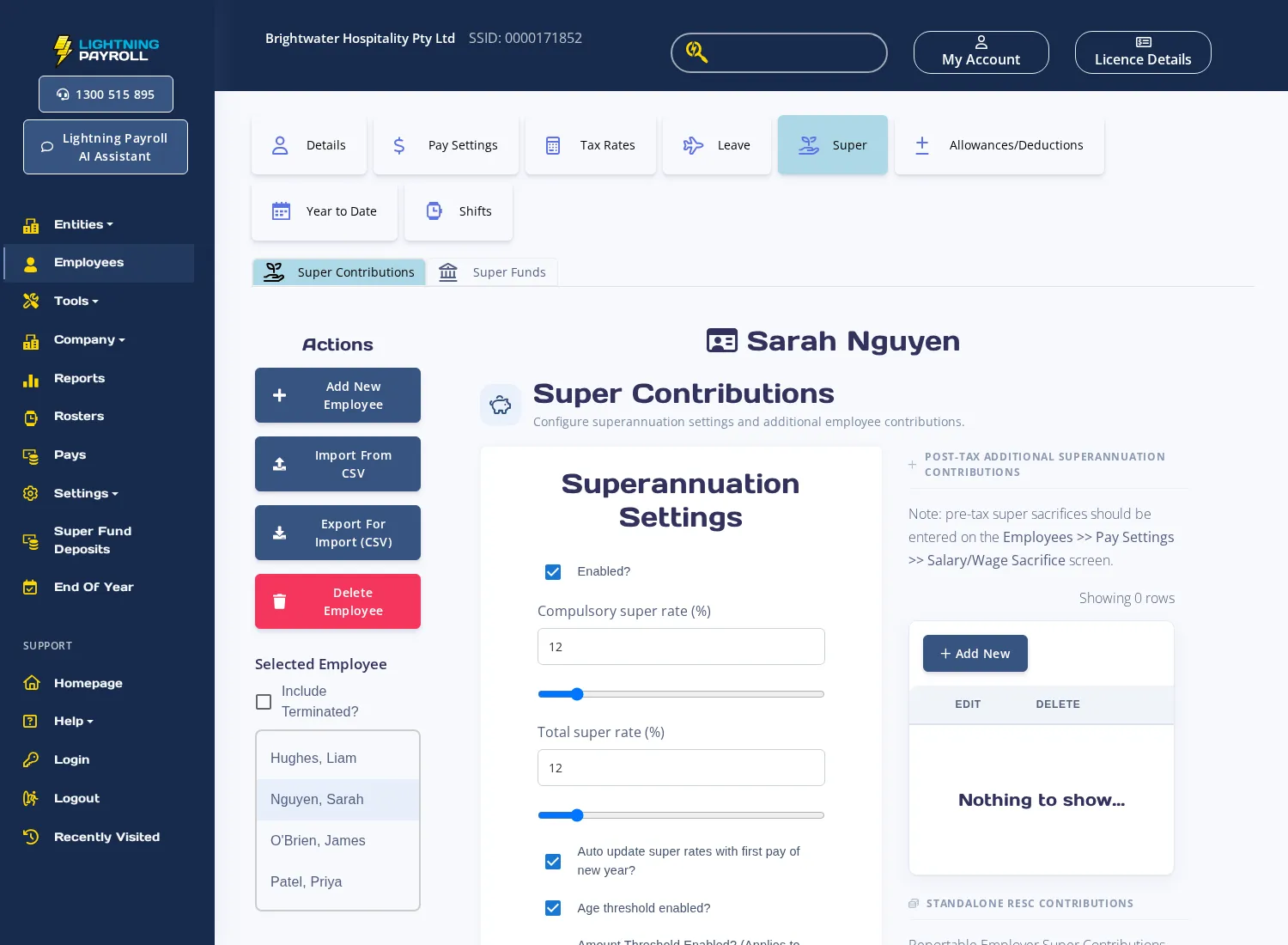
Note: Post-tax contributions added here are not treated as RESC and are not reported through STP.
See also: How Do I Setup A Salary Sacrifice? and What Are Concessional Super Contributions?

