


Answer
Leave accruals in Lightning Payroll are controlled by configuring an individual employee's settings under Employees >> Leave >> Leave Settings. Accruals can be made to occur by the pay period or by the hours worked (pro rata).
Note: Lightning Payroll applies the most common accrual settings when a new employee is created, based on the given STP employment status. Leave settings should be carefully considered to suit your employee's state and award. Each state has different LSL rules, and each award can have its own particular requirements such as annual leave loading or differing entitlement days per year. While Lightning Payroll can assist with LSL payouts, LSL amounts often need to be calculated manually. An example of a complex difference in LSL can be seen here.
Accrue by Pay Period
A typical full-time employee's settings might look like this. In this example, the employee does not get annual leave loading.
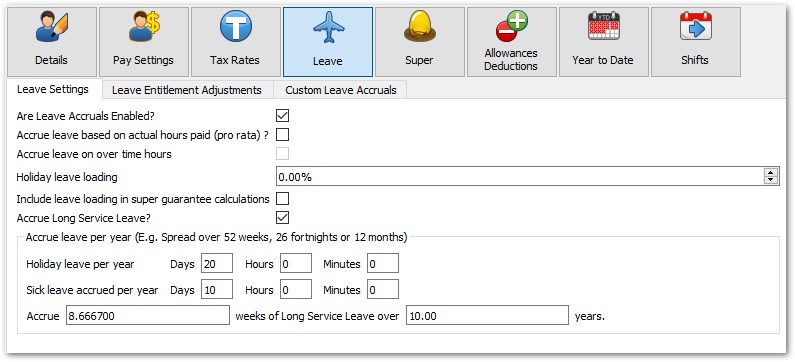
This employee accrues 20 days holiday leave and 10 days sick/personal leave as per the Fair Work National Employment Standards.
How many hours per day this calculates is based on the employee's award hours for a full day. These are configured under Employees >> Pay Settings.

The formula used by Lightning Payroll to calculate accruals for one pay run in this scenario is:
days of leave entitlement per year x award hours per day / pays per year
For example, a weekly full-time employee would accrue:
Annual - 20 days x 7.6 hrs / 52 weeks = 2.92307 hours per week
Personal - 10 days x 7.6 hrs / 52 weeks = 1.46153 hours per week
Long Service Leave is slightly different, as it is usually required to accrue by a number of weeks per 7, 10 or 15 years. With the 'per pay period' leave settings shown above, and an entitlement of 8.6667 weeks every 10 years, it would calculate:
(8.6667 weeks per 10 years x 38 hours per week) / 10 years / 52 weeks = 0.6333 hours per week
Accrue by Hours Paid (Pro Rata)
A typical part-timer with pro-rata annual leave accruals would look like this:
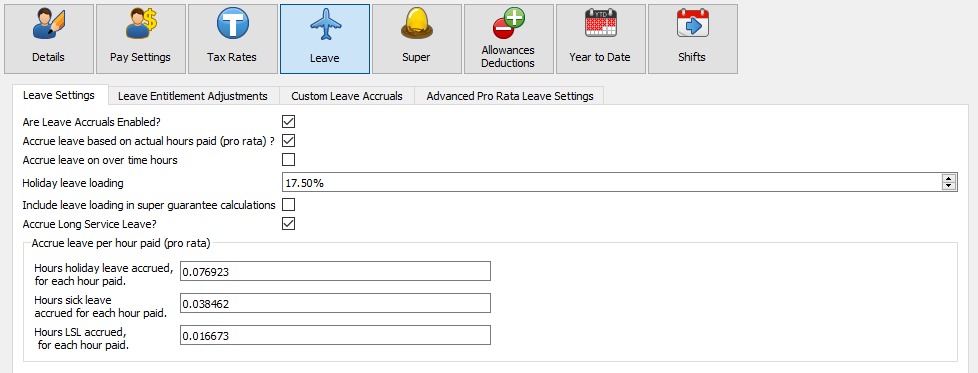
Their pro-rata leave accruals are controlled by the Hours leave accrued, for each hour paid fields.
These decimal values accrue the same result as above if a part-time employee worked 38 hours per week. For example:
Annual - 38 hrs x 0.076923 = 2.92307 hrs
Personal/Sick - 38 hrs x 0.038462 = 1.46155 hrs
Long Service - 38 hrs x 0.016667 = 0.633346 hrs
Note: the program's default long service leave pro-rata rate is 0.016667 (8.6667 weeks / 520 weeks). Per-state rates may differ slightly depending on the week convention used.
Sometimes you might need to calculate a pro rata amount manually. See our next FAQ on pro rata accrual rates for a more detailed explanation of how these work and how to change them for a special situation.

