Switch site
Lightning Payroll Logo Lightning Payroll Logo
  • Home
  • Features
  • News
  • Pricing
  • Support
  • Contact
  • Login
    • Client Login
    • Employee Login
Buy Now
  • Sun images
  • Vector Images
Lightning Payroll Logo Lightning Payroll Logo
  •   Home
  •   Buy Now
  •   Support
  •   Current Support Issues
  •   Contact
  •   Features
  •   News
  •   Pricing
  •   Client Login
  •   Employee Login

How Can I Reinstate A Terminated Employee?

  • Home
  • Frequently Asked Questions
  • Pays
  • How Can I Reinstate A Terminated Employee?

Answer

If you would like to reinstate a terminated employee, go to the Employees tab >> click on Show Terminated Employees >> select the employee you wish to reinstate >> then click on Actions and choose Reinstate Employee.
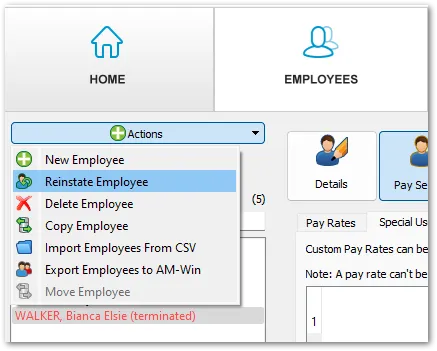
Reinstate Employee

  • Created: 15/05/2019 1:37 AM
  • Last Edited: 18/03/2026 9:32 AM
  • ID: 89

    Related Pays FAQs

  • How Do I Set Up An Employee Deduction With Automatic Limits?
  • How Do I Limit A Deduction By Number Of Pay Applications?
  • How Do I Limit A Deduction By Total Dollar Amount?
  • What Should I Know About Deduction Limit Start Dates And Tracking?
  • How Do I Change The Processed Date Or Pay End Date For Completed Pays?
  • How Do I Process a Pay?
  • How Can I Terminate an Employee (Basic)?
  • Can I Add My Company Logo to the Payslips?
  • How Do I Create An Additional Pay?
  • How Do I Create Additional Pay Rates For Employees?

Search Tags

Terminated EmployeeReinstate EmployeeEmployees TabActions MenuPayroll SupportEmployee ManagementReinstatement Process

Get Started with a free 30 day trial.

 No credit card required.

By clicking the Download button, you acknowledge you agree to the Terms of Service.

Note: If prompted to download multiple files, please say "Yes".

Windows Download Legacy Windows Installer*
Mac Download Legacy Mac Installer*
Online/Web
System Requirements

Windows: 8.1, 10 & 11 (Server installations are not supported)
Mac OSX: 10.14+

Lightning Payroll online (web-based) version requires a modern web browser, with Javascript enabled. No software installation required when using this method. When subscribed you may use both desktop and online versions interchangeably.

*Legacy versions will not be receiving any future updates. They should not be used after June 2024.

Social Media

Join Our Growing Community

Review us on Google Google Logo Review us on Trustpilot Trustpilot Logo

Main Links

  • Features
  • Buy / Renew
  • Support
  • Trust Centre
  • Client Login
  • Download (Windows)
  • Download (Mac)

Learn More

  • About Us
  • Terms & Conditions
  • Privacy
  • Support Policy
  • FAQs
  • Contact Us
  • Partners

Contact

[email protected]
1300 515 895

Logo
Lightning Payroll is published, distributed and supported by Intellitron Pty Ltd. As part of Constellation Software via its operating group Vela Software Group, Lightning Payroll benefits from a strong corporate platform, international support and continues to operate with the same small company responsiveness.

© Intellitron Pty Ltd 2026

AU NZ