Answer
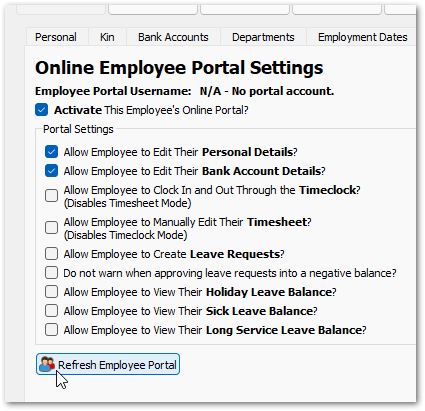
If you have edited an employee's address or personal details and they seem to not be saving or keep changing back then you may need to refresh their employee portal.
In cases when you have activated the employee portal settings, and in particular, have granted the employee with the ability to edit their personal details or bank accounts you've essentially given the employee permanent right-of-way and responsibility for their own principle data. While the employee has these permissions, the matching fields in Lightning Payroll are greyed out (under Employees >> Details >> Personal, Kin and Bank Accounts) with an Owned by employee portal notice. If you wish to do a change on their behalf, first untick the matching Allow Employee to Edit Their Personal Details? or Allow Employee to Edit Their Bank Account Details? box under Employees >> Details >> Online Portal, make the change, then force it through to our server by clicking Refresh Employee Portal on the same tab. This will prevent the employee's online data overriding what is recorded in the payroll system.