Switch site
Lightning Payroll Logo Lightning Payroll Logo
  • Home
  • Features
  • News
  • Pricing
  • Support
  • Contact
  • Login
    • Client Login
    • Employee Login
Buy Now
  • Sun images
  • Vector Images
Lightning Payroll Logo Lightning Payroll Logo
  •   Home
  •   Buy Now
  •   Support
  •   Current Support Issues
  •   Contact
  •   Features
  •   News
  •   Pricing
  •   Client Login
  •   Employee Login

What Do The Single Touch Button Colours Mean?

  • Home
  • Frequently Asked Questions
  • Single Touch
  • What Do The Single Touch Button Colours Mean?

Answer

The button colour highlights the result of the most recent Single Touch message response.

  • Blue means that this pay currently has no messages sent.
  • Grey means the message has been sent and awaiting response or that a new message has been received and you need to view it.
  • Green means the ATO successfully processed your STP event.
  • Red means there is an unsuccessful or failed STP response message.
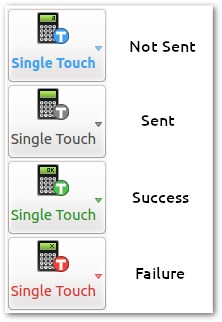
STP Button Colours

  • Created: 22/08/2019 9:25 AM
  • Last Edited: 08/11/2024 1:54 PM
  • ID: 178

    Related Single Touch FAQs

  • What does the Supplier Not Authorised - CMN.ATO.AUTH.008 Error mean?
  • How Do I Create a Machine Credential?
  • Why Are Two Income Statements Showing For The Same Employment?
  • What Are STP Adjust Events & How Can I Use Them to Correct BAS Pre-Fill Amounts?
  • Why Has Services Australia Contacted Me About Child Support Deductions?
  • Why Have Centrelink Recorded An Incorrect Pay Amount For An Employee?
  • How Can I Use the Single Touch Recon Tool to Check ATO STP Records?
  • Why Are Single Touch Payroll Update Events Showing As $0.00 Gross And Tax?
  • What Can I Do if I Forget My Machine Credential Password?
  • Why Should I Have To Pay For Machine Credential Assistance?

Search Tags

Single Touch ReportingButton ColoursMessage ResponseAto ProcessingSuccessful ResponseFailed ResponsePayroll Status

Get Started with a free 30 day trial.

 No credit card required.

By clicking the Download button, you acknowledge you agree to the Terms of Service.

Note: If prompted to download multiple files, please say "Yes".

Windows Download Legacy Windows Installer*
Mac Download Legacy Mac Installer*
Online/Web
System Requirements

Windows: 8.1, 10 & 11 (Server installations are not supported)
Mac OSX: 10.14+

Lightning Payroll online (web-based) version requires a modern web browser, with Javascript enabled. No software installation required when using this method. When subscribed you may use both desktop and online versions interchangeably.

*Legacy versions will not be receiving any future updates. They should not be used after June 2024.

Social Media

Join Our Growing Community

Review us on Google Google Logo Review us on Trustpilot Trustpilot Logo

Main Links

  • Features
  • Buy / Renew
  • Support
  • Trust Centre
  • Client Login
  • Download (Windows)
  • Download (Mac)

Learn More

  • About Us
  • Terms & Conditions
  • Privacy
  • Support Policy
  • FAQs
  • Contact Us
  • Partners

Contact

[email protected]
1300 515 895

Logo
Lightning Payroll is published, distributed and supported by Intellitron Pty Ltd. As part of Constellation Software via its operating group Vela Software Group, Lightning Payroll benefits from a strong corporate platform, international support and continues to operate with the same small company responsiveness.

© Intellitron Pty Ltd 2026

AU NZ